
Registration and Logging In
Q. What is a Invitation code?
The Invitation Code allows you to register and access one of Razzbonicʻs clients specific online media libraries. When your Media Library Administrator ( Razzbonicʻs client) creates the login they associate certain permissions or rights for you to enter a particular media library. In order for you to register and receive these permissions you need their Invitation Code. Chosen specifically for you. Please contact your Media Library Administrator directly for this information.
Q. Where do I get the Invitation Code?
Each one of Razzbonic’s clients has a Media Library Administrator. This person is solely responsible for giving you the Invitation Code to access their own media library.
Q. Who is my Media Library Administrator?
The Media Library Administrator is the person who is responsible for giving you permission to access their online media library. Razzbonic manages the online media libraries of many different companies. If you need to contact a particular Media Library Administrator, you will need to know what company they are with. Razzbonic will then introduce you to that person. Only they can send you the required Invitation Code to access their online media library. If you have questions, please contact us via our Contact Page.
Q. How do I register?
Your Media Library Administrator ( Razzbonicʻs client) will send you their specifc Registration URL(web address) and the Invitation code.
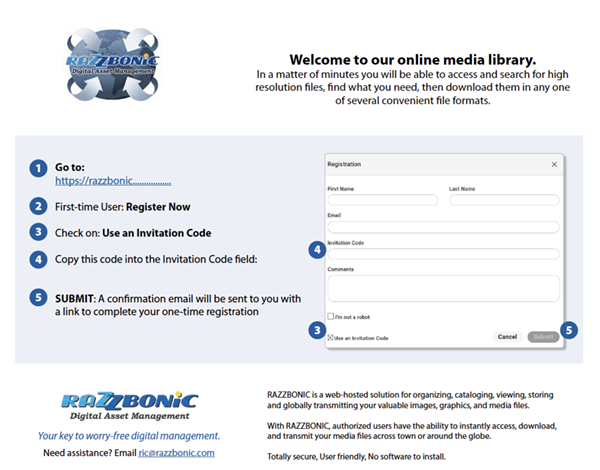
Like this.
1) Go to the URL and login screen
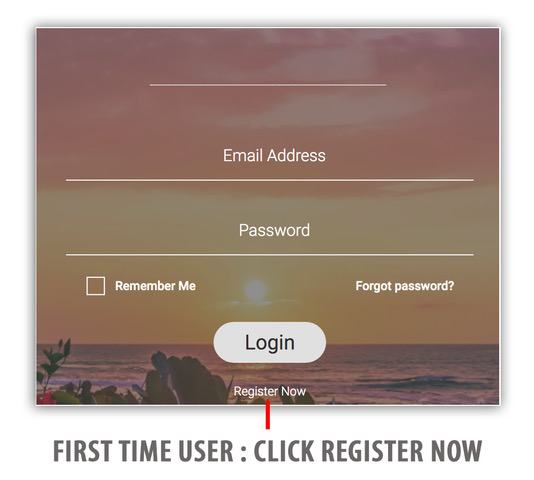
2) First time User : Click Register Now
3) Copy and paste the Invitation code, then click [x] Use an Invitation Code.
4) Complete the form. Please check your inbox (or junk folder) for an email with instructions to complete your registration. The email will be from noreply@canto.com