


You can choose to send your selected files in two convenient ways.
First select the file or files that you wish to share.
You can access the share window by clicking the Share button.
Click the email icon in the share window.
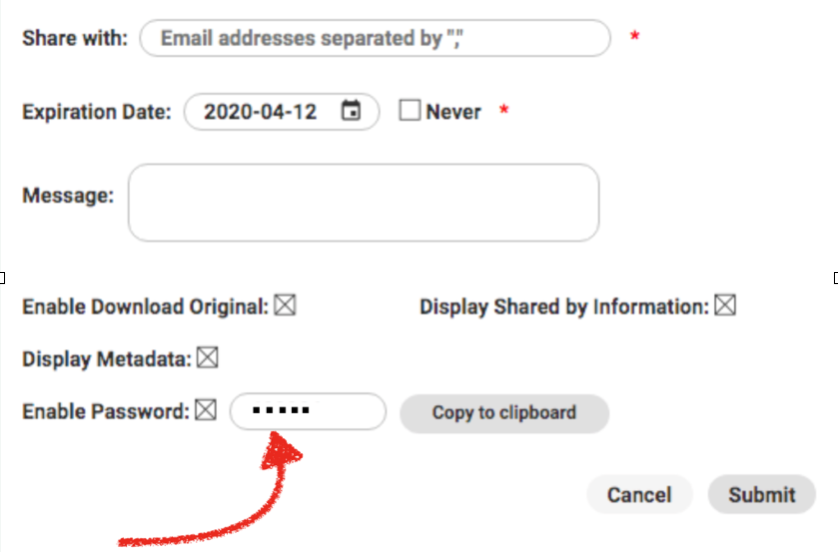
Enter one or many email addresses seperated by “,”, an expiration date (if desired), and your email message.
You can also toggle the option for Advanced Download features for the recipient, which allows for them to zoom, crop, and change the size of the image.

Another option that you have is to require a Password or Not? This might be dependent on to whom you are sending the files to. Click copy to clipboard.
Some people add their own email so that they have a copy of what they sent.
Click Submit to send the email
To share files with external users without using email, use a Link. First select the file or files that you wish to share. You can access the share window by clicking the Share button.
The link option appears in the share window as the chain-link icon like this.
Click on it.
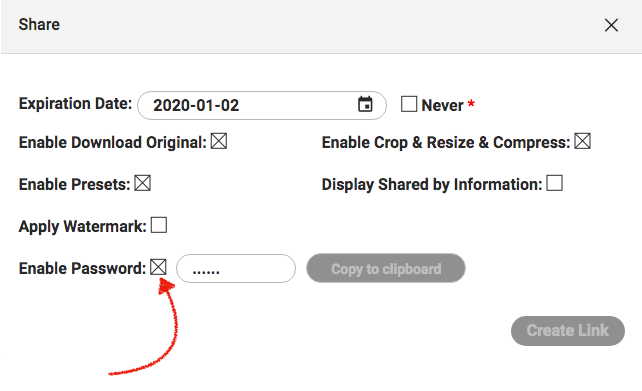
You’ll be asked to provide an Expiration Date. Or click [ ] Never*
Additionally, you can enter more details when creating a link.